Last updated: 21 September 2026
Current testing version: aeeb7d67e1-260921 (21 September 2026)
There is a command-line tool mks5lboot for Windows, Linux and macOS, which can install, update or uninstall the bootloader.
Jump to: Compatibility: Models | NAND flash | Installation instructions | DFU mode | Download | Building mks5lboot | Usage | Support | Contribution
| Model Number | Model Name | Installation method |
|---|---|---|
| A1137 | iPod nano | Use the official Rockbox installation, no need to read this page |
| A1199 | iPod nano (2nd generation) | |
| A1236 | iPod nano (3rd generation) | Unofficial Rockbox installation available, read below |
| A1285 | iPod nano (4th generation) |
NOT supported. No need to ask "when it's done?", we already know that you want it. Asking is not going to speed up anything. If the developers need any testers, it will be announced, and you'll get a chance to help. Until then, keep checking this page for updates! |
| A1320 | iPod nano (5th generation) | |
| A1366 | iPod nano (6th generation) | |
| A1446 | iPod nano (7th generation) |
IMPORTANT! Please check if your model number (on the back of the device) matches, before proceeding with the installation!
See the tables below.
| SK Hynix | ||||
|---|---|---|---|---|
| Capacity | JEDEC ID | Banks/CE | Page size | Status |
| 4GB | A514D3AD | 4 | 2KiB | ✅ Validated |
| 8GB | A555D5AD | ⚠️ Checked read-only | ||
| B614D5AD | 4KiB | 🛟 Testers needed | ||
| Micronas | ||||
|---|---|---|---|---|
| Capacity | JEDEC ID | Banks/CE | Page size | Status |
| 4GB | B614D5EC | 2 | 4KiB | ⚠️ Checked read-only |
| 8GB | 4 | ⚠️ Checked read-only | ||
| 2555D5EC | 2KiB | 🛟 Testers needed | ||
| Toshiba | ||||
|---|---|---|---|---|
| Capacity | JEDEC ID | Banks/CE | Page size | Status |
| 4GB | A585D598 | 2 | 2KiB | 🛟 Testers needed |
| 8GB | 4 | 🛟 Testers needed | ||
| 4GB | BA94D598 | 2 | 4KiB | 🛟 Testers needed |
| 8GB | 4 | ⚠️ Checked read-only | ||
| Intel | ||||
|---|---|---|---|---|
| Capacity | JEDEC ID | Banks/CE | Page size | Status |
| 4GB | A5D5D589 | 2 | 2KiB | ⚠️ Checked read-only |
| 8GB | 4 | ⚠️ Checked read-only | ||
| 4GB | 3E94D589 | 2 | 4KiB | ⚠️ Checked read-only |
| 8GB | 3ED5D789 | 🛟 Testers needed | ||
| Micron | ||||
|---|---|---|---|---|
| Capacity | JEDEC ID | Banks/CE | Page size | Status |
| 4GB | A5D5D52C | 2 | 2KiB | ⚠️ Checked read-only |
| 8GB | 4 | 🛟 Testers needed | ||
| 4GB | 3E94D52C | 2 | 4KiB | 🛟 Testers needed |
| 8GB | 3ED5D72C | 🛟 Testers needed | ||
| 16GB | A701882C | 8KiB | ⏳ Reported | |
IMPORTANT! Please make sure that your iPod is formatted using FAT32 (a.k.a. WinPod) before attempting to install the bootloader! Installation will not work on HFS/HFS+ iPods (a.k.a. MacPods).
If you get this screen after installing the bootloader:
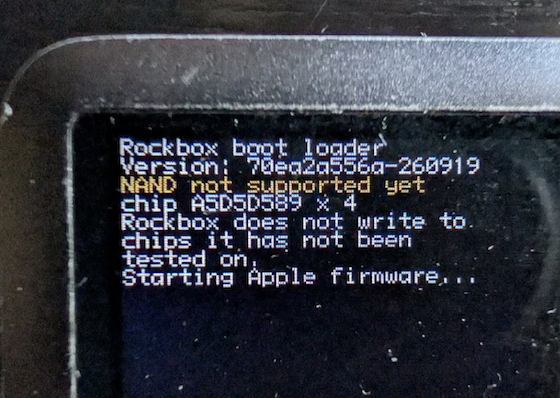
It means your device's NAND flash memory has not been tested yet. You can help validating and enabling it for you and others that have the same model of flash memory. Join one of the channels listed in the Support section, and we'll give you instructions on how to proceed.
At some point during the installation, you need to switch your iPod to DFU (device firmware update) mode. This has proven to be tricky, so here are additional instructions
A device in DFU mode is hard to tell apart from a turned off device. The screen is completely black, nothing happens if you press any of the buttons. But if you connect it to a computer, the USB IDs are different - Product ID is 1223 (here's a table of iPod Product IDs).
Most recent version
Older versions
You need git, GNU make and a compiler (gcc/clang). Also, you need to install the development package of libusb (called libusb-1.0.0-dev on Linux or libusb-dev on Mac)
Unlock the HOLD switch, or press any button if already unlocked.
Hold down the PLAY button, until you see Shutting down...
Hold down MENU+SELECT, until the iPod reboots. Release them immediately after the screen goes black.
Turn off the iPod, then turn it on and immediately lock the HOLD switch.
- OR -
Turn off the iPod, then turn it on and immediately hold down MENU.
Turn off the iPod. Power it on by holding down SELECT+PLAY, keep holding until Disk mode starts.
Turn off the iPod. Power it on by holding down SELECT+LEFT, keep holding until Diagnostics mode starts.
Turn off the iPod. Power it on by holding down SELECT+RIGHT, keep holding until you see the USB Mode message.
Enter DFU, then run the following command: ./mks5lboot --bl-uninst ipodnano3g.
Uninstall the bootloader first so you don't run into any issues! Then delete the .rockbox folder on the iPod.
As this installation method is not yet official, please use the following channels:
For the officially supported models (iPod nano, iPod nano 2nd gen), you can use the official Rockbox support channels:
These instructions are available on GitLab, merge requests are welcome!